Introduction

Day 1
GBA Hardware

Day 2
"Hello, World!"

Day 3
Input

Day 4
Backgrounds -
  Bitmapped Modes

Day 5
Sprites

Day 6
Backgrounds -
  Tile Modes

Day 7
Project 1 -
  Tetris

Quiz - Week 1

Day 8
Sprites #2 -
  Animation

Day 9
Maps

Day 10
Sprites #3 -
  Animation #2

Day 11
Backgrounds -
  Rotation

Day 12
Sprites #4 -
  Mosaic

Version History

Downloads

Forums

Books

Links

Graphics FAQ

GFX2GBA Readme

Translations

Games

Projects

Credits

Support

Poll

HAM Tutorial :: Fonts Howto


The purpose of this document is to show you how to download and use free fonts in your games. We'll convert TTFs to GIFs and then to BMPs.

There may be better programs out there, but I personally like Font2Gif. It's freeware and very easy to use.
Download the latest version here. (324 KB) Ver 1.2 mirrored locally here.

Next you'll need a free font to use. I have found many useful fonts at 1001FreeFonts.com. For this tutorial I downloaded the first one,
Alien League
(13 KB). Mirrored locally here.

Unzip alien.zip (or whichever font you downloaded)
Click Start -> Settings -> Control Panel
Double-click Fonts.
Copy ALIEN.TTF to Fonts. This should install the font.

Unzip font2gif.zip
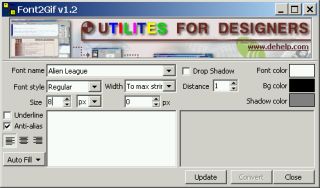
Double-click font2gif.exe to open the program.
Choose Alien League next to Font name.
Next to Size, choose a 8,16,32 or 64 (however big you want it).
Change Font Color to white (or preferred color).
Change Bg Color to black (or preferred alpha blended color)
Now, you can type in your characters or if you want to make it really easy on yourself, choose Auto Fill -> Digits, CAPS, All font chars, etc.

Click Convert.
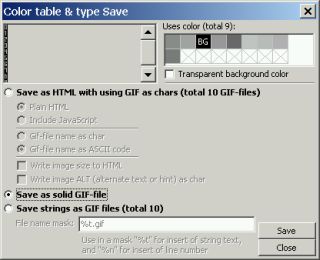
Select Save as solid GIF-file.
Click Save.

Give it a name.
Click Save.
Close font2gif.

Now you have your fonts in a GIF file. All you have to do is open the image in your favorite program and save it as a bitmap. Just make sure it's a bitmap with an indexed palette.


Downloads

font2gif.zip (324 KB) Ver 1.2
Alien League font (13 KB)
alien_league.gif, alien_league.bmp (16 pixel font)

Freeware Fonts

Nick's Fonts


<<

HOME

>>